
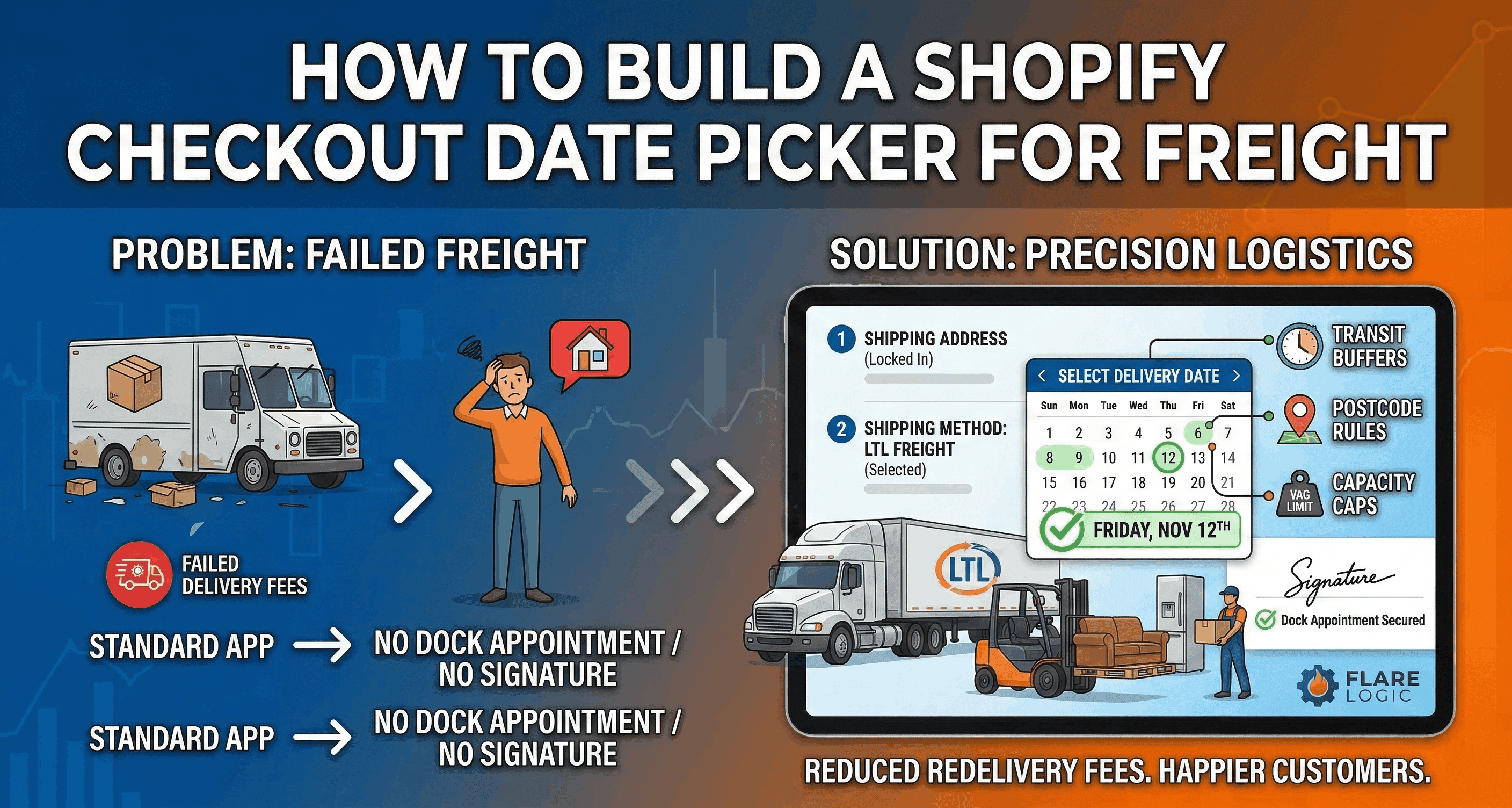
How to Build a Shopify Checkout Date Picker for Freight
Learn how to implement a Shopify checkout date picker for freight. Discover Shopify Plus checkout extensions, native limits, and top apps like Flare.
If you sell t-shirts, shipping is easy. The customer clicks "buy," the shirt goes into a poly mailer, and the post office drops it in a mailbox. The exact delivery date does not strictly matter.
However, if you sell $5,000 custom sectionals, commercial refrigerators, or pallets of porcelain tile, shipping is a high-stakes logistical puzzle. These items cannot be left on a porch. They require Less-Than-Truckload (LTL) freight carriers, two-man delivery teams, dock appointments, and customer signatures.
For these heavy-goods merchants, letting a customer buy a product without agreeing to a specific delivery date is a recipe for disaster. If the freight truck arrives on a day the customer is not home, the delivery fails. You get hit with hundreds of dollars in redelivery fees, and the customer is furious.
To prevent this, you need a Shopify checkout date picker for freight.
In this comprehensive guide, we will explain exactly why standard e-commerce date pickers fail for freight, the monumental difference between cart-level and checkout-level calendars, and how to use advanced apps (like Flare) and Shopify Plus Checkout Extensibility to build a flawless freight scheduling system.
Key Takeaways for Logistics Managers:
Checkout vs. Cart: Avoid apps that place the date picker on the Cart page. Freight quotes and postcode restrictions require the picker to live directly inside the Checkout flow.
Shopify Plus is an Advantage: Only Shopify Plus allows for deep Checkout UI Extensibility, allowing the date picker to interact seamlessly with shipping rates.
The Flare App: For high-volume heavy goods, the Flare app is widely considered the industry standard for complex postcode and freight scheduling.
Cut-Off Times: A true freight date picker must factor in picking, packing, and transit times automatically to prevent impossible delivery promises.
Why Standard Date Pickers Fail for Freight
If you search the Shopify App Store for "delivery date," you will find hundreds of apps. The vast majority of these apps are built for local florists, bakeries, or pizza shops.
A bakery app assumes that if a customer wants a cake on Tuesday, the bakery will bake it on Tuesday morning and drive it 5 miles down the road that afternoon.
Freight logistics do not work like that. If a customer in New York wants a dining table delivered on a Friday, and your warehouse is in California, the table must be packed on Monday, loaded onto an LTL carrier on Tuesday, driven across the country for three days, and routed to a local hub before it can be delivered on Friday.
A standard Shopify checkout date picker for freight will fail because it lacks the mathematical depth to calculate those transit buffers.
The Transit Time Problem
When a customer selects "Friday," they mean delivery on Friday. A basic app just adds a note to the order: "Customer requested Friday."
However, your warehouse needs to know what day to ship the item. If you use a basic date picker, your operations team has to manually calculate the transit time for every single order. They have to look up the customer's ZIP code, check the LTL carrier's transit map, subtract four days, and manually schedule the dock pickup for Monday.
If your store processes 50 freight orders a day, this manual calculation requires a full-time employee and invites catastrophic human error. A true Shopify checkout date picker for freight must handle this transit math automatically.
The Postcode Routing Problem
Local delivery apps assume you deliver everywhere within a 20-mile radius. Freight carriers operate on strict, asymmetric postcode routes.
For example, your two-man delivery team might only visit Northern postcodes on Tuesdays and Thursdays, and Southern postcodes on Mondays and Wednesdays. If your date picker allows a Southern customer to select a Tuesday, you have created a logistical impossibility. You will have to call the angry customer, apologize, and force them to reschedule.
A powerful Shopify checkout date picker for freight must look at the customer's exact shipping address and instantly gray out the invalid days on the calendar.
The Geography of the Date Picker: Cart vs. Checkout
Before you install any software, you must understand the most critical architectural decision in Shopify date selection: where the calendar lives.
You have two options: the Cart page or the Checkout flow. For freight, one of these is terrible, and the other requires Shopify Plus.
The Flaws of the Cart Page Date Picker
Most cheap delivery apps place the calendar on the /cart page, right before the customer clicks the final "Checkout" button.
To a developer, this is easy to build. The app simply captures the date and injects it as an "Order Note" or "Cart Attribute." Shopify carries that note through the checkout process.
Why this fails for freight: On the Cart page, the customer has not yet entered their shipping address. If the app does not know where the customer lives, how can it calculate transit time? How can it enforce postcode restrictions? How can it know if the customer is choosing standard LTL freight or expedited White Glove delivery?
It cannot. A Cart-page date picker forces you to offer the exact same calendar to a customer who lives one mile away and a customer who lives three thousand miles away. For heavy goods, this is completely useless.
The Power of the Checkout Date Picker
The only correct way to implement a Shopify checkout date picker for freight is to place the calendar inside the secure Shopify checkout flow, specifically after the customer has entered their shipping address.
Once the address is locked in, a smart app can instantly query the carrier database, read the postcodes, apply your custom transit buffers, and render a calendar perfectly calibrated to that exact buyer.
The Catch: Historically, Shopify heavily locked down the checkout page to ensure PCI compliance and security. Standard Shopify merchants cannot inject code into the checkout.
To place a calendar in the checkout flow seamlessly, you must use Shopify Checkout UI Extensions, which are predominantly gated behind the Shopify Plus enterprise plan.
If you are a heavy goods retailer doing serious volume, upgrading to Shopify Plus simply to access Checkout Extensibility is often worth the ROI, purely to solve this freight scheduling nightmare.
Top App Recommendations for Freight Logistics
If you are ready to implement a Shopify checkout date picker for freight, you need software that understands complex logistics. While apps like Omega (DingDoong) or Zapiet are fantastic for local food delivery, heavy goods require a different class of software.
1. Flare (The Industry Standard for Freight)
When premium furniture brands, mattress companies, and appliance retailers need a Shopify checkout date picker for freight, they almost universally turn to Flare.
Flare was explicitly built to solve the problems that standard local-delivery apps ignore.
Why Flare works for Freight:
Deep Postcode Rules: Flare allows you to upload massive CSV files mapping specific zip codes to specific days of the week. If a customer in ZIP
90210enters their address, the Flare checkout widget instantly re-renders the calendar to only show the days your truck is legally routed to that zone.Checkout Extensibility Native: Flare is built natively as a Shopify Checkout UI Extension. It lives perfectly inside the Shopify Plus checkout, meaning it captures the exact address before showing the calendar.
Product-Specific Lead Times: If you sell a ready-to-ship lamp alongside a custom 12-week sofa, Flare is smart enough to read the cart contents and push the earliest available date out by 12 weeks.
Automated Order Tagging: Flare automatically tags the Shopify order with the exact "Ship Date" and "Delivery Date," making it incredibly easy for your warehouse team to filter and prioritize pick lists.
2. Pickeasy
While slightly more tailored toward local pickup, Pickeasy has strong features for complex delivery routing. It offers advanced blockout dates, limiting how many heavy items can be scheduled for a single day to prevent overloading your warehouse dock.
3. Custom Builds via UI Extensions
If you have a world-class development team and highly proprietary routing software (like a custom AS400 mainframe or a highly specific ERP), off-the-shelf apps might not work.
With Shopify Plus, your developers can build a private Shopify app using Checkout UI Extensions. They can write a script that takes the customer's shipping address in step 2 of checkout, pings your private ERP via API to ask "When can our truck get to this house?", and then renders a completely custom calendar directly in the Shopify checkout UI.
While this is expensive to build, it represents the absolute highest tier of a Shopify checkout date picker for freight.
Configuring Your Freight Date Picker
If you choose a platform like Flare to act as your Shopify checkout date picker for freight, you cannot simply install it and walk away. You must configure the mathematical rules that protect your operations team.
Here is the exact framework you need to build inside the app settings:
Step 1: Define Your Prep Times
Heavy goods cannot be picked in five minutes. If an order comes in at 3 PM on a Tuesday, your warehouse needs time to pull the pallet, wrap it, and stage it on the dock.
You must set a Minimum Prep Time in your app (usually 24 to 48 hours). This ensures that if a customer buys a sofa on Tuesday, the absolute earliest date they can select on the calendar is Thursday or Friday.
Step 2: Establish Cut-Off Times
If your daily LTL freight truck leaves the dock at 2 PM, any order placed at 2:01 PM cannot ship until tomorrow.
You must establish strict Cut-Off Times in the app. If a transit buffer requires exactly 3 days, an order placed at 11 AM will calculate differently than an order placed at 4 PM. The app must mathematically shift the entire calendar out by 24 hours the second the clock strikes your cut-off threshold.
Step 3: Implement Capacity Limits
A freight truck can only hold so many pallets. If you allow fifty customers to select Friday for delivery, your logistics network will break, and you will have to disappoint forty customers.
Your Shopify checkout date picker for freight must support Order Limits or Capacity Caps. You tell the app: "We can only fulfill 10 heavy freight deliveries per day." Once the tenth customer selects Friday on the calendar, the app automatically grays out Friday for all subsequent shoppers, forcing them to choose Monday.
Step 4: Map Your Postcode Restrictions
If you run a hub-and-spoke logistics model, you must map your delivery radii. You will configure Zone A (0-50 miles) to allow delivery 5 days a week. You will configure Zone B (50-200 miles) to only allow delivery on Tuesdays and Thursdays.
When the checkout UI extension reads the address, it applies this exact logic instantly.
Handling the "Mixed Cart" Scenario
The ultimate stress test for any Shopify checkout date picker for freight is the Mixed Cart.
What happens when a customer adds a massive, heavy-freight dining table (3-week lead time, requires LTL scheduling) and a small set of dining chairs (in-stock, ships via standard UPS ground) to the same cart?
If your date picker is poorly configured, it will offer the customer a date next week. The chairs will arrive next week, but the table will not be ready for three weeks. The customer will panic, assuming the table was stolen.
Split Shipping vs. Consolidated Shipping
You must program the app to handle this conflict.
Option A (Consolidated): The app reads the cart, identifies the "slowest" item (the table), and forces the calendar to only show dates three weeks out. The warehouse holds the chairs and ships everything together on one pallet. This saves you massive shipping costs but annoys customers who want immediate gratification.
Option B (Split Shipping): The app ignores the chairs completely, allowing them to ship immediately via standard UPS without a date picker. It then renders the Shopify checkout date picker for freight specifically and exclusively for the dining table line item.
Option B is highly advanced and typically requires Shopify Plus, third-party apps, and a capable 3PL that can easily handle split fulfillment.
The Impact on Conversion Rates
A common fear among merchants is that adding friction (like forcing a customer to select a date) will lower conversion rates.
With freight, the exact opposite is true.
When a customer spends $4,000 online, they are incredibly anxious. If the checkout process feels too simple (if they just type in their credit card and hit "buy" with no discussion of how this massive item will enter their home) they get nervous. They abandon the cart.
Advanced Integration: Connecting Date Pickers to ERP Systems
To master your Shopify checkout date picker for freight, you must think beyond the Shopify ecosystem entirely. Shopify is a front-end sales engine. Your backend is where the actual fulfillment happens.
If your Shopify checkout date picker for freight allows a customer to select Friday, November 12th, but your Enterprise Resource Planning (ERP) software does not recognize that input, the entire system collapses. A human operator will have to type that chosen date into the ERP manually, stripping away all the automated benefits.
Using Webhooks and Middleware
The best apps, like Flare, support webhooks and complex metadata tagging. When a shopper picks a date using your Shopify checkout date picker for freight, the app writes that exact date into the Shopify order JSON payload in a standard format (like YYYY-MM-DD).
To securely pass this data, you should use middleware software like Zapier, Make.com, or Celigo. The middleware catches the Shopify order, reads the injected date data, and translates it flawlessly into your ERP (like NetSuite, Katana, or DEAR Inventory).
The Real-Time Inventory Check
A truly elite Shopify checkout date picker for freight does not just push data; it pulls data. If your ERP knows that you just ran out of raw steel, it can execute an API call to your date picker app, temporarily disabling all dates for the next three weeks. By connecting these systems, your front-end customer promises always cleanly match your back-end operational realities. This reduces WISMO support tickets to near zero.
A professional, well-designed Shopify checkout date picker for freight adds a layer of operational authority to your website. It proves to the buyer that you have done this before. It signals that you are a serious logistics company, not just a drop-shipper.
When a customer can visually select a date, their anxiety drops. They feel in control of the transaction. They know exactly when they need to take the day off work to wait for the truck.
By implementing an advanced Shopify checkout date picker for freight, you do more than streamline your warehouse. You actively build trust, eliminate WISMO tickets, and increase the likelihood that a high-ticket browser becomes a high-ticket buyer.